ClassCTRL provides class-management software to studios (gymnastics, dance, martial arts, and similar). When a studio enables text messaging, its customers (parents and adult students) can opt in to receive SMS account notifications, class reminders, payment receipts, and one-time verification codes (2FA) from that studio. This page documents exactly how that opt-in works and the consent language a customer sees.
How customers opt in
Opt-in is collected digitally inside the studio's ClassCTRL customer portal. There are two places a customer can give consent:
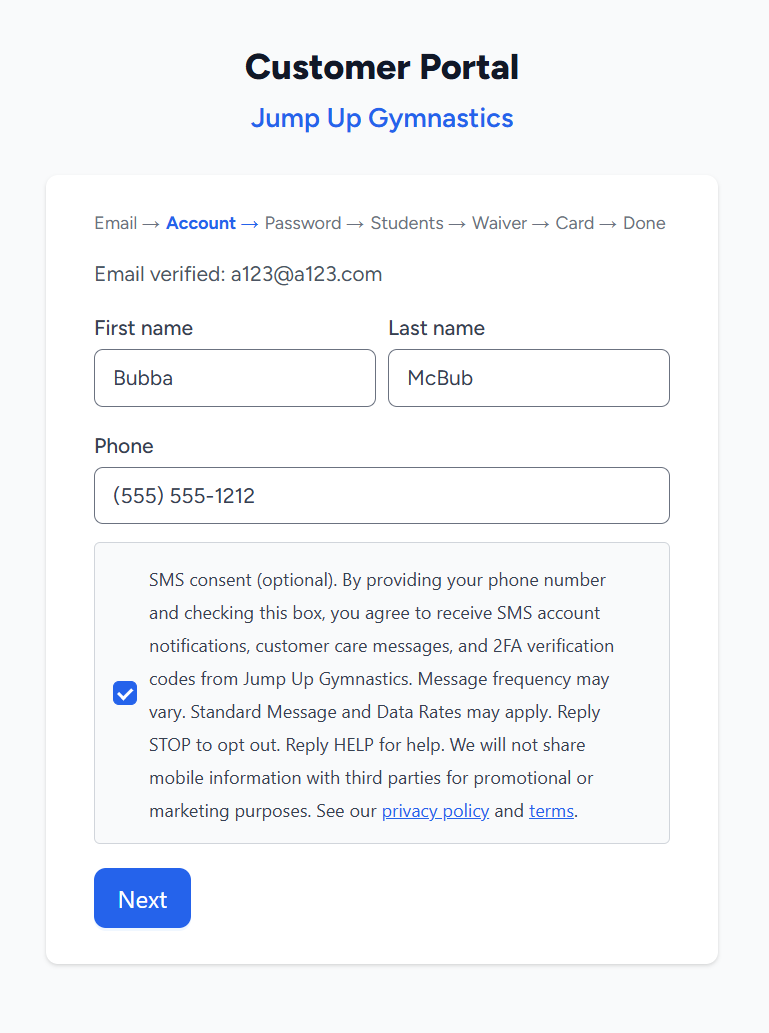
- During account creation — at the account step, where the customer enters their phone number, an SMS consent checkbox is shown directly beneath the phone field with the full consent disclosure.
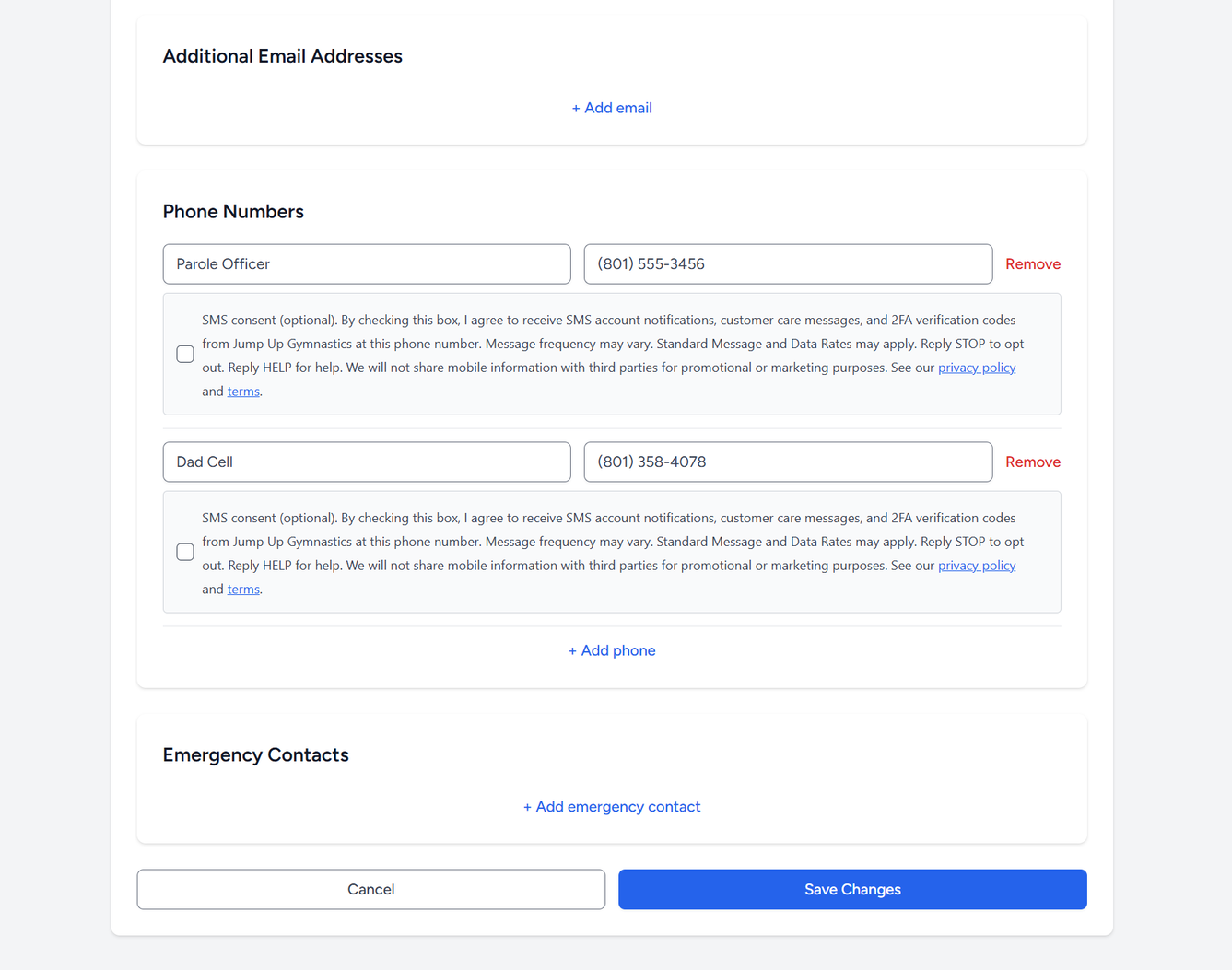
- In their portal profile — for existing customers, each phone number on file has its own SMS consent checkbox with the same disclosure, so consent can be granted or revoked per number at any time.
The consent checkbox is unchecked by default, is optional (the customer can complete signup without checking it), and is separate from any other consent (such as email preferences or the liability waiver). No text messages are sent to a number unless the customer has affirmatively checked the SMS consent box for that number.
The opt-in form (new customers)
Below is the account-creation step of the customer portal, showing the phone-number field and the SMS consent checkbox with its disclosure. (Example studio: "Jump Up Gymnastics".)
Managing consent (existing customers)
Existing customers manage SMS consent per phone number in their portal profile. Each phone row has its own consent checkbox with the same disclosure, so consent can be granted or revoked at any time, independently for each number on file.
Consent language shown to the customer
The disclosure displayed next to the consent checkbox reads, verbatim (the studio's name replaces "[Studio]"):
"By providing your phone number and checking this box, you agree to receive SMS account notifications, customer care messages, and 2FA verification codes from [Studio]. Message frequency may vary. Standard Message and Data Rates may apply. Reply STOP to opt out. Reply HELP for help. We will not share mobile information with third parties for promotional or marketing purposes."
Confirmation message
After a customer opts in, the first message they receive confirms the subscription:
"You're now subscribed to [Studio]. Reply HELP for help, STOP to opt out. Msg & data rates may apply."
What messages customers receive
Studios send transactional and account-related messages such as:
- Payment receipts and past-due balance notices
- Class reminders and schedule changes
- Account notifications and customer-care replies
- One-time verification codes (2FA) for portal sign-in
Message frequency varies based on the customer's account activity. Standard message and data rates may apply.
Opting out and getting help
- Reply STOP to any message to opt out. The customer receives a one-time confirmation and no further messages are sent to that number.
- Reply HELP to any message for help, or contact the studio directly.
- Consent can also be revoked at any time in the customer's portal profile by unchecking the SMS consent box on the phone number.
- Mobile opt-in information and consent are never shared with third parties for promotional or marketing purposes.
Related policies
For full details, see our Privacy Policy (including the SMS / Text Messaging section) and Terms of Service.
Contact Us
Questions about SMS messaging or this opt-in process?